
How Do You Check Performance Parts Order Accuracy?

Last Updated: November 14, 2026
Quick Summary
To check parts order accuracy, compare the packing slip to your original order line by line before installing anything, confirming part numbers, quantities, and that all hardware bags are present. Then verify the slip matches your order confirmation and the part matches your vehicle. Document any discrepancy with photos and the listing screenshot before filing a claim.
- Order accuracy rate equals error-free orders divided by total orders, multiplied by 100.
- Track accuracy weekly, not quarterly, so you can spot which catalog update caused a dip.
- Run seven checkout checks, including confirming whether hardware ships included or as separate line items.
- Ask in writing whether the order ships with all mounting hardware, gaskets, and fasteners.
- Split the headline rate into fitment, pick, quantity, and hardware errors to see where to aim.
Table of Contents
- Why Performance Parts Order Accuracy Fails
- The Order Accuracy Formula You Can Actually Use
- Performance Parts Fitment Verification Before You Buy
- Your Parts Order Picking Checklist for Checkout
- Preventing Missing Hardware in Parts Orders
- Checking the Order After Delivery: What to Compare
- KPIs That Tell You If Your Order Process Is Working
- Filing a Claim: Documentation for an Incorrect Order
- Frequently Asked Questions
Why Performance Parts Order Accuracy Fails
Parts order accuracy is the share of orders that ship with the correct part, the correct quantity, and every piece of required hardware, delivered to the right customer on the first attempt.
A wrong fitment lookup, a superseded part number, or a catalog page that lists one engine code for three trims produces a perfect pick of the wrong part. The picker did nothing wrong. The data did.
Three failure points account for most bad performance parts orders:
- Fitment data gaps. Listings that stop at year, make, and model instead of trim and engine code.
- Catalog drift. Suppliers supersede a part number and the listing keeps the old one.
- Kit incompleteness. Hardware, gaskets, and bolts ship as separate line items and get dropped.
That last one stings the most. A turbo kit that arrives without its oil feed fittings is technically an accurate pick and a useless delivery.
The Order Accuracy Formula You Can Actually Use
Order accuracy rate equals the number of error-free orders divided by total orders, multiplied by 100.
Here is the formula in plain form:
Order accuracy rate = (Error-free orders ÷ Total orders) × 100
Track it weekly, not quarterly. A weekly number tells you which supplier or catalog update caused a dip. A quarterly number just tells you the quarter was bad.
Break the number into four error categories so you can act on it:
| Error Type | What It Captures | Who Owns the Fix |
|---|---|---|
| Fitment error | Wrong part for the vehicle | Catalog and fitment data team |
| Pick error | Right part, wrong item pulled | Warehouse and picking process |
| Quantity error | Short or over-shipped line items | Packing and quality control |
| Hardware error | Kit missing bolts, gaskets, fittings | Kit assembly and inspection |
One blended accuracy rate hides which of these is bleeding. Four separate rates tell you where to aim.
Performance Parts Fitment Verification Before You Buy
Performance parts fitment verification is the process of confirming a part matches your specific vehicle configuration before money changes hands. It is the highest-use step in the whole order, because a fitment error caught at checkout costs nothing to fix. A performance-parts order needs a fitment audit covering engine code, transmission, factory options, existing modifications, and intended use.
The Minimum Data Set, and Why Four Fields Are Not Enough
Year, make, model, and trim is the minimum data set for any fitment check. For Hondas and Acuras, add engine code and transmission.
An 11th Gen Civic Si and a base Civic Sport share a body but not a powertrain. A suspension kit listed for "Civic 2022+" may bolt to one and not the other.
Before you order, write down:
- Year, make, model, and trim
- Engine code and displacement (e.g., K20C1 vs. L15B7, Coyote vs. EcoBoost)
- Transmission type (manual, automatic, CVT, DCT) and drivetrain (FWD, RWD, AWD)
Match every field against the listing. If the listing covers only three of the four, ask before you buy.
Resolving Fitment Conflicts When the Listing Does Not Match Your Car
A fitment conflict is any case where your vehicle data and the listing data disagree, or where the listing is too vague to confirm. There are four common conflict types, and each has a different resolution path:
- Trim or engine-code mismatch. The listing says "fits 2019-2023" but does not name the engine. Resolution: request the manufacturer's application guide or a photo of the actual mounting flange before ordering.
- Superseded part number. The listing shows an old number; the manufacturer has replaced it. Resolution: confirm the supersession in writing and verify the new number carries the same fitment.
- Option-package dependency. The part fits only cars with a specific factory option (e.g., performance brake package, sport suspension). Resolution: confirm your VIN or build sheet against the option code.
A common pattern is that the listing is technically correct but incomplete, it fits some configurations in the year range and not others. The fix is not to guess; it is to get the application guide in writing.
When Your Vehicle Is Modified or Nonstandard
Modified vehicles break standard fitment data. A car with an aftermarket intake, a different ECU, or a swapped engine no longer matches the catalog's assumptions.
This is where a general listing fails and expert support earns its keep. Our team at how to build performance cars with expert support can confirm fitment against your actual setup so you are not guessing at checkout.
The rule is simple: the more modified the car, the less you should trust an automated fitment filter and the more you should trust a person who has built the same platform.
Pre-Shipment Confirmation: The Step Between Checkout and the Box
Fitment verification does not end at checkout. Before the order ships, confirm three things in writing: the part number on the order matches your research, the quantity matches the job, and any hardware or adapter required for your configuration is included or explicitly listed as separate.
Watch out: assuming a "direct fit" label means no adaptation. Direct fit usually means stock configuration only; modified cars frequently need adapters, relocation brackets, or a different variant of the same part.
Your Parts Order Picking Checklist for Checkout
A parts order picking checklist is a short, repeatable set of checks that runs before the order is finalized. It catches errors while they are still free to fix.
Run these seven checks at checkout:
- Confirm the part number matches your fitment research, character for character.
- Check the listing's quantity against what the job actually needs.
- Verify whether hardware ships included or as separate line items.
- Confirm the part is in stock, not backordered.
- Check the return policy for special-order and electrical parts.
- Save the order confirmation and listing screenshots.
- Note the expected delivery window.
Step 3 is the one people skip. It is also the one that produces the angriest phone calls.
Preventing Missing Hardware in Parts Orders
Missing hardware in parts orders usually traces to one of two causes: the kit genuinely does not include it, or the listing never made that clear. Both are preventable at the point of order.
Ask one direct question before you buy: "Does this ship with all mounting hardware, gaskets, and fasteners?" A clear answer in writing is your protection.
For kit orders, compare the listing against a complete hardware manifest. If you are unsure what a full kit should contain, review the essential hardware pieces for turbo kit installation so you know exactly which bolts, fittings, and gaskets to expect in the box.
Watch out: assuming "complete kit" means every fastener is included. Many kits ship the main component and sell hardware separately, and that gap only surfaces mid-install.
Checking the Order After Delivery: What to Compare
Compare the packing slip to your original order line by line before you install anything, at the workbench, in good light, with the parts still in their bags.
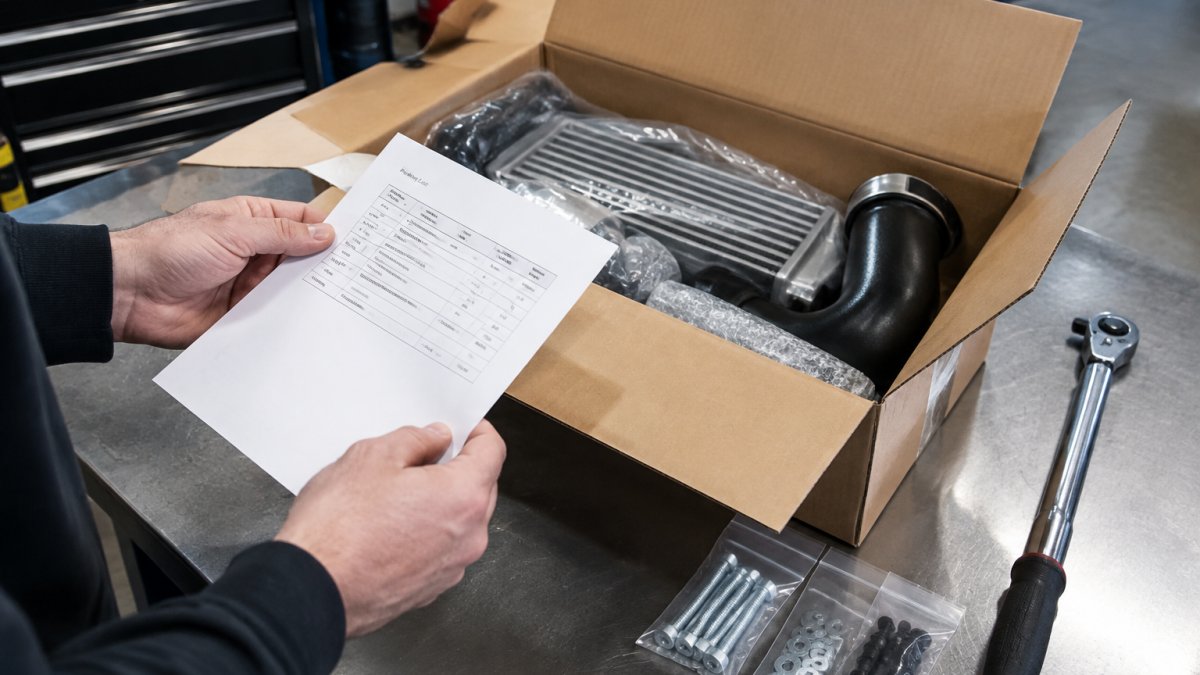
Work through this delivery audit in three passes:
Pass 1, Box to slip:
- Part numbers on the box match the packing slip
- Quantity per line item is correct
- All hardware bags are present and sealed
Pass 2, Slip to order confirmation:
- Every line item on the slip appears on your order confirmation
- No substitutions were made without your written approval
- The part number on the slip matches the number you researched, character for character
Pass 3, Part to vehicle:
- The part number stamp or label on the part itself matches the box and slip
- The mounting points, flange pattern, and connector types match your vehicle
- The included hardware matches the manufacturer's manifest for that part number
If anything fails a check, stop and document before you touch the part. An installed part is much harder to return than an unopened one.
Distinguishing a Wrong Part from a Correct Part with Wrong Listing Data
Not every discrepancy is a picking error. Before you file a claim, diagnose which of five failure modes you are looking at, because each one has a different resolution path:
- Pick error. The box contains a different part number than the slip. Resolution: photo of the box label and the part stamp, claim against the seller's picking process.
- Quantity error. The slip is correct but the count is short or over. Resolution: photo of the sealed bags and the slip, claim against packing QC.
- Hardware error. The main component is correct but the kit is missing fasteners, gaskets, or fittings. Resolution: compare against the manufacturer's hardware manifest, request the missing pieces.
A common pattern is that the customer assumes a fitment error is a shipping error and files the claim against the wrong party. The diagnostic above keeps the claim pointed at the actual cause, which shortens resolution time.
The Evidence Package for an Incorrect Order
Documentation wins incorrect-order claims. The customer who has the order confirmation, the listing screenshot, and delivery photos gets resolved fast. The one who has a vague memory of what they bought does not. Keep this evidence for every order:
- Order confirmation email with part numbers and quantities
- Screenshot of the listing at time of purchase, including fitment claims and the "what's in the box" section
- Packing slip photo and box photos on arrival, before opening
Watch out: the trickiest case is a correct part with incorrect listing data. The part number matches, the box matches, but the listing described the wrong fitment.
If something does go wrong with an order, contact support with the full evidence package in hand. At Axion Performance Parts, our team works through fitment and order issues with customers directly, and a complete record makes that conversation short.
KPIs That Tell You If Your Order Process Is Working
Order accuracy KPIs are the small set of numbers that show whether your verification process is actually catching errors. Track these five:
- Order accuracy rate. Your headline number, split by the four error types above.
- Picking accuracy. Right part pulled, measured separately from fitment errors.
- Hardware completeness rate. Share of kit orders that ship with every required fastener.
Review these weekly. A single bad supplier batch or a bad catalog update shows up as a spike, and a spike you catch in week one is a recall you avoid in week four.
Filing a Claim: Documentation for an Incorrect Order
Documentation wins incorrect-order claims. The customer who has the order confirmation, the listing screenshot, and delivery photos gets resolved fast. The one who has a vague memory of what they bought does not.
Keep this evidence for every order:
Watch out: the trickiest case is a correct part with incorrect listing data. The part number matches, the box matches, but the listing described the wrong fitment. That is a listing error, not a shipping error, and it needs the listing screenshot to prove it. Without that screenshot, you are arguing from memory.
If something does go wrong with an order, contact support with the full evidence package in hand.
Getting order accuracy right comes down to verifying fitment before you buy, checking hardware before you install, and documenting everything in between.
Frequently Asked Questions
How do you measure order accuracy?
Order accuracy is measured by dividing the number of orders delivered correctly (right part, right quantity, right condition, right documentation) by the total number of orders shipped, then multiplying by 100. For performance parts, count an order as inaccurate if any single line item fails, including missing hardware or a fitment mismatch. Track the result weekly rather than quarterly so you can spot a supplier or process problem before it becomes a pattern.
What is a good order accuracy rate for performance parts?
A strong target for parts orders is 99% or higher, because a single wrong turbo flange or missing gasket can stall a build for days. Many general fulfillment operations run in the 95-98% range, but performance parts have less tolerance for error since fitment is vehicle-specific. If your own rate falls below 98%, audit the last 20 orders line by line to find where the errors cluster, whether that is picking, catalog data, or packaging.
How can you verify that a performance part fits your vehicle?
Start with year, make, model, trim, and engine code, then confirm the part number against the manufacturer's fitment data rather than a marketplace listing alone. Check whether the part is designed for stock or modified setups, since coilovers, big brake kits, and turbo kits often change clearance. If your vehicle has custom work, call or message the seller with your build details before ordering so they can confirm compatibility.
What should you do if a performance parts order is incomplete or incorrect?
Photograph the box, packing slip, and every item received before installing anything, then compare the shipment against your order confirmation line by line. Contact the seller within their stated claim window with the photos and your order number, and describe exactly which part number or hardware item is wrong or missing. Keep the packaging until the claim is resolved, since carriers and sellers often require it as evidence.


