
Avoiding Missing Hardware on Performance Orders

Table of Contents
- Why Missing Hardware Derails Performance Builds
- The Automotive Parts Order Checklist for Performance Builds
- Performance Parts Fitment Verification Before You Order
- Packing Slip Verification: Matching What Arrived to What You Ordered
- Handling Missing Parts in Shipment and Split Deliveries
- Purchase-Order Controls for Business and Industrial Equipment
- Common Pitfalls That Lead to Incomplete Orders
- Frequently Asked Questions
Last Updated: October 18, 2026
Why Missing Hardware Derails Performance Builds
A single missing bolt can stop a build dead. That's the hard truth about avoiding missing hardware on performance orders: the smallest component in the box decides whether your car hits the road or sits on jack stands.
The real cost of a single missing bolt goes well beyond the part itself.
How do incomplete orders happen? A few common ways:
- The seller ships from multiple warehouses and one box never leaves
- Small hardware gets tossed loose and falls out of a torn bag
- A backordered bracket ships separately with no clear notice
None of these are rare. The fix is process, not luck.
The Automotive Parts Order Checklist for Performance Builds
The best automotive parts order checklist is simple: confirm the part, confirm the quantity, confirm the fitment, and save everything. Run these steps before you pay.
Before you click buy:
- Write out a bill of materials for the job, down to bolts, clamps, and gaskets
- Check stock status on every line item, not just the headline part
- Confirm the part number matches your platform and trim
At checkout:
- Review the cart against your bill of materials line by line
- Confirm quantities, especially for hardware kits
- Check the shipping method and estimated delivery schedule
- Save the order confirmation email and screenshot the cart
This is where most people get lazy. They buy the turbo and forget the install kit. Then the box arrives and the project stalls on a gasket.
Performance Parts Fitment Verification Before You Order
Performance parts fitment verification means proving a part fits your exact vehicle before money changes hands. Skip it and you risk a return, a restocking fee, or a part that never installs.
Start with the basics every seller should confirm:
- Year, make, model, and trim
- Engine code and drivetrain
- Transmission type where relevant
- Any existing modifications that change clearance or mounting
VIN and platform checks
Your VIN is the fastest way to lock down the exact build. Many sellers let you enter it to filter compatible parts. Use it.
For a Subaru WRX or an Acura Integra, platform and generation matter just as much. A part listed for one generation often won't bolt to another.
We keep fitment notes on our product pages for exactly this reason.
Packing Slip Verification: Matching What Arrived to What You Ordered
Packing slip verification is the act of checking every item on the slip against what's actually in the box before you install anything. Do it the moment the package lands, not a week later.
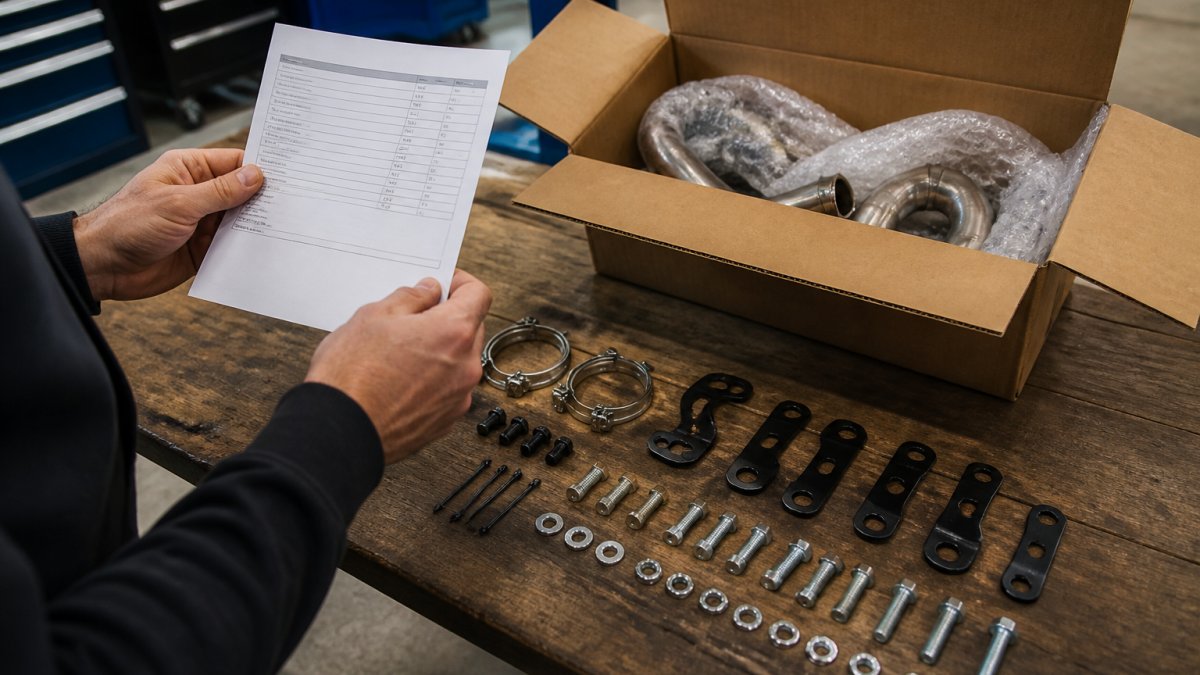
Line-by-line reconciliation
Set the slip beside the parts and work down the list. Check the part number, the quantity, and the condition of each item. Tick each line only when the physical part matches. If a line says two clamps and you count one, stop and note it right there.
Hardware that hides in packaging
Small hardware loves to hide. Bolts roll into corner flaps. Gaskets stick to the inside of the box. Clamps nest inside foam. Shake out every piece of packaging and check the bottom before you decide something is missing. In practice, a good share of "missing" parts turn up wedged in the packing material.
Handling Missing Parts in Shipment and Split Deliveries
Missing parts in a shipment are common when an order ships in multiple boxes. The hard part isn't noticing a gap, it's proving the part is actually missing rather than sitting on a truck two states away. Most practitioners find that a structured split-shipment log prevents both false alarms and late claims.
Build a split-shipment log before the first box lands
As soon as the order confirmation arrives, open a simple spreadsheet or note with one row per carton. Capture:
- Carrier and tracking number for each box
- The line items and quantities assigned to that carton, per the confirmation or shipping notice
- Expected delivery date and current tracking status
- A received-on date and a reconciliation column
When a box arrives, mark it received and reconcile its contents against its assigned lines. Any line not yet received stays open until either the part arrives or the carrier's tracking shows the shipment as delivered or lost. This is the single control that separates a genuinely missing item from one still in transit.
Distinguish in-transit from missing
A part is only a candidate for a missing-item claim when one of these is true:
- The tracking number for its carton shows delivered, but the carton never arrived or arrived without that line
- The seller's shipping notice lists the part in a carton that has no tracking number at all
- The carrier marks the shipment as lost or returned to sender
- The seller's stated ship-by date has passed with no tracking activity
Until one of those conditions is met, treat the part as in transit and keep the row open. Calling support too early usually produces a "please wait for the rest of the shipment" reply and resets your clock.
When to report and how to document
Report a missing part the same day you confirm it's absent. Document the claim in one message with:
- Photos of each carton as received, including the shipping label and any damage
- Photos of the packing slip and the parts you did receive, laid out and countable
- The order number, the specific line item, and the quantity short
- Screenshots of every tracking number and its status
Send it all in one message to customer support. A clear, documented claim moves far faster than a vague "something's missing" email. Keep the thread until you have a resolution: a replacement, a refund, or a credit.
Purchase-Order Controls for Business and Industrial Equipment
For shops and teams buying performance hardware at scale, a purchase order is the control that prevents gaps. A purchase order ties every part to a number, a quantity, and an approval, so nothing ships vague. The competitive gap here is the receiving side: most guides stop at "use a PO" and never show how to reconcile what arrives against what was ordered.
Set the controls before the PO is issued
- Attach a bill of materials to every purchase order, down to fasteners, clamps, and gaskets
- Require a named approver for any line above a threshold your team sets
- Record the supplier's part number, quantity, unit price, and promised ship date on each line
- Flag any line that ships separately or sits on backorder, with an expected date
Run a receiving and reconciliation workflow
When a shipment arrives, the receiving owner should:
- Match the carton count and packing slip to the purchase order before opening anything
- Count each line against the PO quantity and note any short, over, or substituted item
- Record serial numbers and part numbers for warranty and asset tracking
- Photograph the packing slip, carton labels, and any damaged packaging
- Log the receipt against the PO in your system the same day
Only after the PO, packing slip, and physical count agree should the invoice be approved for payment. Paying before reconciliation is how shortages become write-offs.
Escalate discrepancies on a timeline
A discrepancy log should capture the PO number, line item, quantity short, date discovered, and the person who found it. Contact the supplier within one business day of discovery, in writing, with photos and the PO reference.
That workflow catches shortages before they hit the install bay. When a shipment arrives short, the paper trail makes the claim straightforward and keeps the project schedule honest.
Common Pitfalls That Lead to Incomplete Orders
Most incomplete orders trace back to a handful of avoidable mistakes. Here's what we see most often, and how to dodge each one.
| Pitfall | What Goes Wrong | The Fix |
|---|---|---|
| Ordering the headline part only | Install kit or hardware left out | Build a full bill of materials first |
| Ignoring backorder notices | Part ships weeks later, install stalls | Confirm stock on every line |
| Skipping fitment checks | Wrong part arrives, return hassle | Verify VIN and platform before buying |
| Tossing the packaging | Claim weakened, no proof | Keep box and slip until reconciled |
| Reporting late | Claim window slips, resolution slows | Report the same day you confirm a gap |
| Not tracking split shipments | Assume a part is missing when it's in transit | Check every tracking number |
The pattern is clear. The people who avoid missing hardware are the ones who slow down for a few minutes at checkout and at unboxing.
Frequently Asked Questions
How can I make sure every item in my performance parts order is included?
Start with an automotive parts order checklist before you buy: confirm part numbers, quantities, and that all hardware (bolts, nuts, brackets, gaskets) is listed separately. At checkout, save the order confirmation and note any split shipments. When the boxes arrive, do packing slip verification line by line before installing anything. If something is missing, report it within 48 hours with photos of the packaging and packing slip. This process minimizes the chance of discovering a missing part mid-install.
What should I do if a part or piece of hardware is missing from an order?
First, verify against your packing slip and order confirmation to confirm the item was supposed to be included. Check all packaging, including inside boxes and under padding, because small hardware often gets lost. Then contact customer support immediately with your order number, photos of the packing slip and packaging, and a clear description of what's missing. Request a replacement or refund and ask for a timeline. Keep all documentation until the issue is resolved. Prompt reporting helps avoid delays.
How do I verify that a performance part fits my vehicle?
Performance parts fitment verification starts with your VIN and platform details. Cross-check the part number against the manufacturer's fitment guide, and confirm compatibility with any existing modifications. Look for notes about required supporting hardware or software. If you're unsure, contact the seller's technical support with your build details before ordering. Many returns happen because buyers skip this step. A few minutes of verification prevents weeks of downtime and return shipping costs.
How can I track backordered items in a multi-item order?
When you place a multi-item order, ask the seller to confirm which items are in stock and which are backordered, and request separate tracking numbers for split shipments. Save all order confirmations and shipping notifications. Use the tracking numbers to monitor each package, and set a reminder to follow up if a backordered item doesn't ship within the stated window. If the delay affects your project deadline, ask about partial shipments or alternatives. Clear communication with customer support keeps you informed.
A missing part shouldn't be the reason your build stalls. With a solid checklist, careful fitment checks, and a documented claim process, you can keep your project moving. At Axion Performance Parts, we back every order with expert support from people who actually build cars, fast shipping, and a curated catalog of JDM performance parts for Honda, Acura, and Subaru platforms. Search our store and get the right parts, all of them, the first time.

